Status and visibilities of objects
ZeyOS has many modules - such as Tasks, Tickets, Transactions, Campaigns or Payments - where a status indicates the current progress of the respective object. The field can take many different forms as it is tailored towards the respective module. It helps to track and filter and therefore gain an overview (and indicate to others) which elements require work, are waiting for customer feedback and so on.
Common elements vs Transactional elements
Status is managed differently for common and transactional elements. You can select status freely for common elements, whereas with transactional elements, you can only change status by performing certain actions, such as booking or canceling a transaction. You cannot manually change the status of a transaction as you see fit, but use the actions available at that point, in order to keep the data and transactional states consistent.
Billing and procurement also offer tailored filtering solutions, so you have an easier time finding open or closed transactions. You can apply that filter on the top of the sidebar on the right in the overview.
Visibility
In general, visibility can take three forms: Regular, Archived and Deleted. You can change visibility by selecting elements and choosing "Archive" or "Delete" in the overview or the details view. 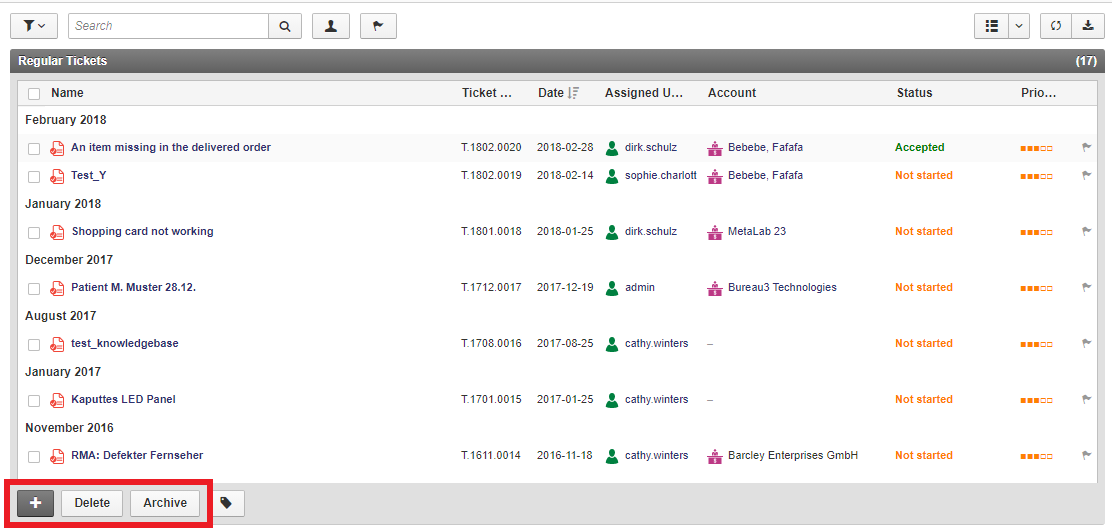
They'll subsequently only appear in the respective visibility filter (in the middle of the sidebar) and will be marked with a corresponding icon in this general overview.
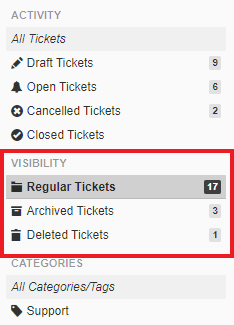
In the respective folders, the items can also be moved directly to one of the other two folders, for example, from "Deleted Projects" to "Archived Projects" or restored. This means that the items you delete are initially moved only to the Deleted Items folder and not immediately removed completely.